Finish the report on site.Not at 10pm.

Capture once, on site. L8Pro checks every reading, files every photo and builds the report while you walk the building.

SCROLL TO WALK THE SITE ↓
01 · Washroom · Low risk

Every outlet.Checked as you go.

02 · Plant room · Low risk

Readings logged.Never retyped.

03 · Tank room · Moderate risk

Spotted. Photographed.Filed.

04 · Shower block · High risk

35.6°C. Flaggedbefore the tap's off.

05 · Walk complete

Report ready.Before you leave site.

  1. The dotted assessor at a row of washbasins, with two hot readings marked Low risk: 56.4°C and 58.1°C.
    01 / 05 · Washroom · Low risk

    Every outlet.Checked as you go.

    Type the hot and cold readings at each tap. Each one is graded as you type it.

  2. The assessor at a calorifier, with the reading flow 61.4°C, return 55.2°C, marked Low risk.
    02 / 05 · Plant room · Low risk

    Readings logged.Never retyped.

    Calorifier flow and return go in once, on site, and reach the report as typed.

  3. The assessor at a cold water tank marked Moderate risk: lid not secure.
    03 / 05 · Tank room · Moderate risk

    Spotted. Photographed.Filed.

    Photos are taken in the app and filed by system, ready for the report.

  4. The assessor at a shower among Legionella bacteria, marked High risk: 35.6°C, below 50°C. A second label reads Legionella grows at 20 to 45°C.
    04 / 05 · Shower block · High risk

    35.6°C. Flaggedbefore the tap's off.

    A hot reading below 50°C is flagged as you type it, and the finding is built from the answer.

  5. The assessor in a pool of light at the end of the corridor, the walk complete.
    05 / 05 · Walk complete

    Report ready.Before you leave site.

    Submit on site and it's at the office for QA.

No double typingNo Word documentsNo photo renamingNo 10pm reportsNo reformatting

Same survey.Shorter day.

Your time on site doesn't change. Everything after it does. Scroll and watch the paperwork disappear.

The usual way
Sent next week
Survey on site
Type up notes
Rename photos
Fight the Word doc
Check and fix
Send
With L8Pro
Ready before you leave
Survey on site, report builds as you go
Review
Send
Your evening back
Done.

Illustration of the steps, not a timed study.

1×
Everything typed once.
On site, on the tablet. It goes straight into the report.
0
Word documents.
No tables to fix, no photos to resize, no compatibility mode.
On site
Where the write-up happens.
The report builds as you capture, so there's no evening at home typing it up.
The app, running.

Typed once. Graded as you go.

Six screens. One pass round the building.

First reading to signed report.
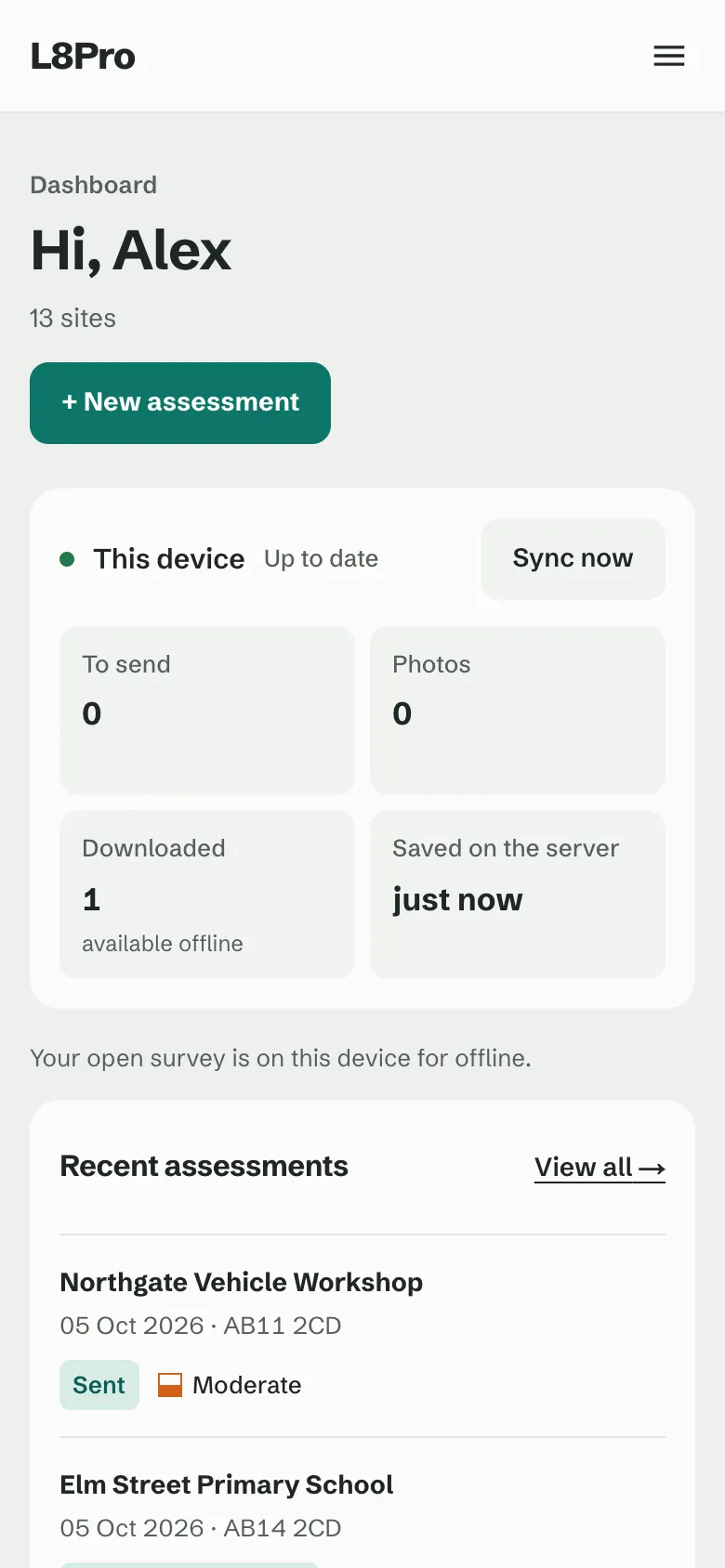
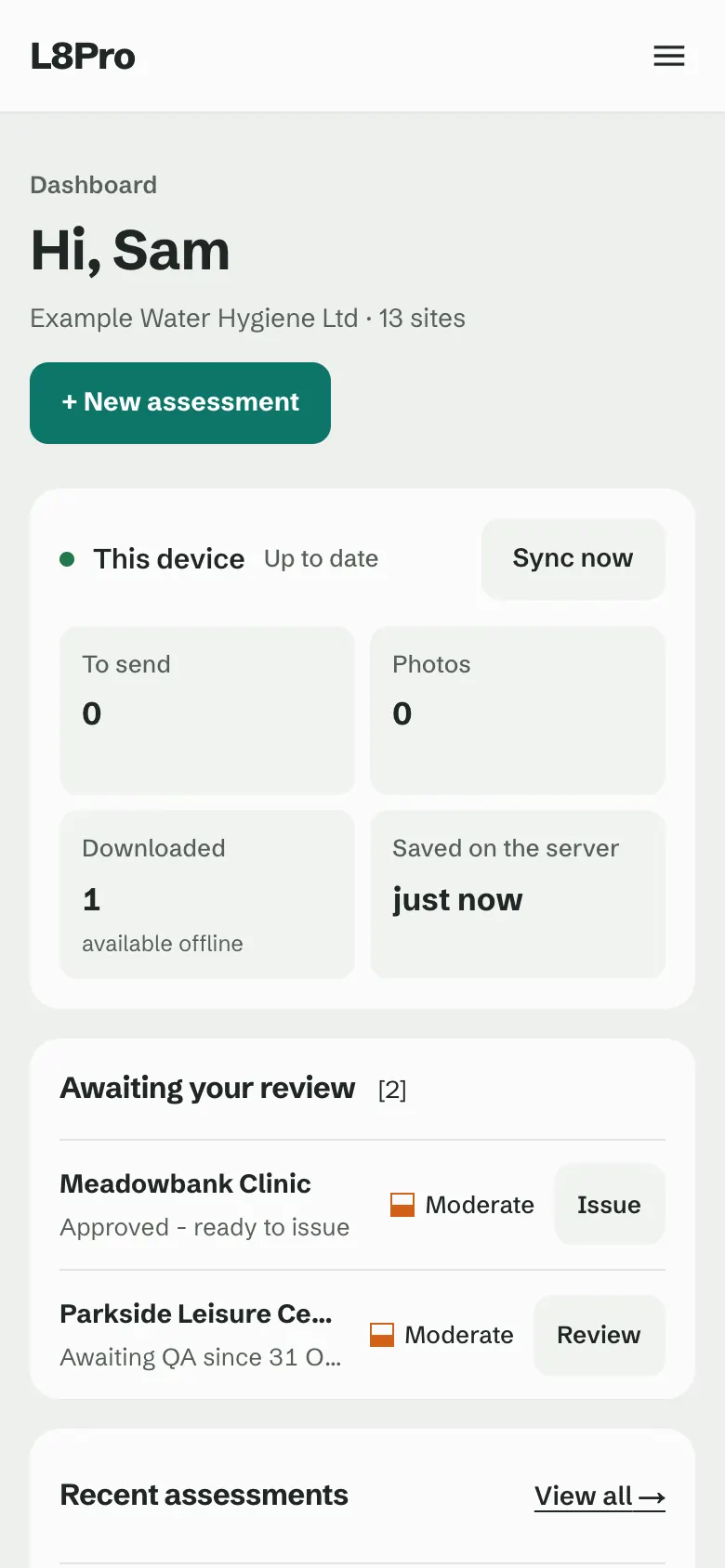
Engineer dashboard on a phone: this device up to date, nothing waiting to send, one assessment downloaded and available offline, and the recent assessments.
01Downloaded before you go
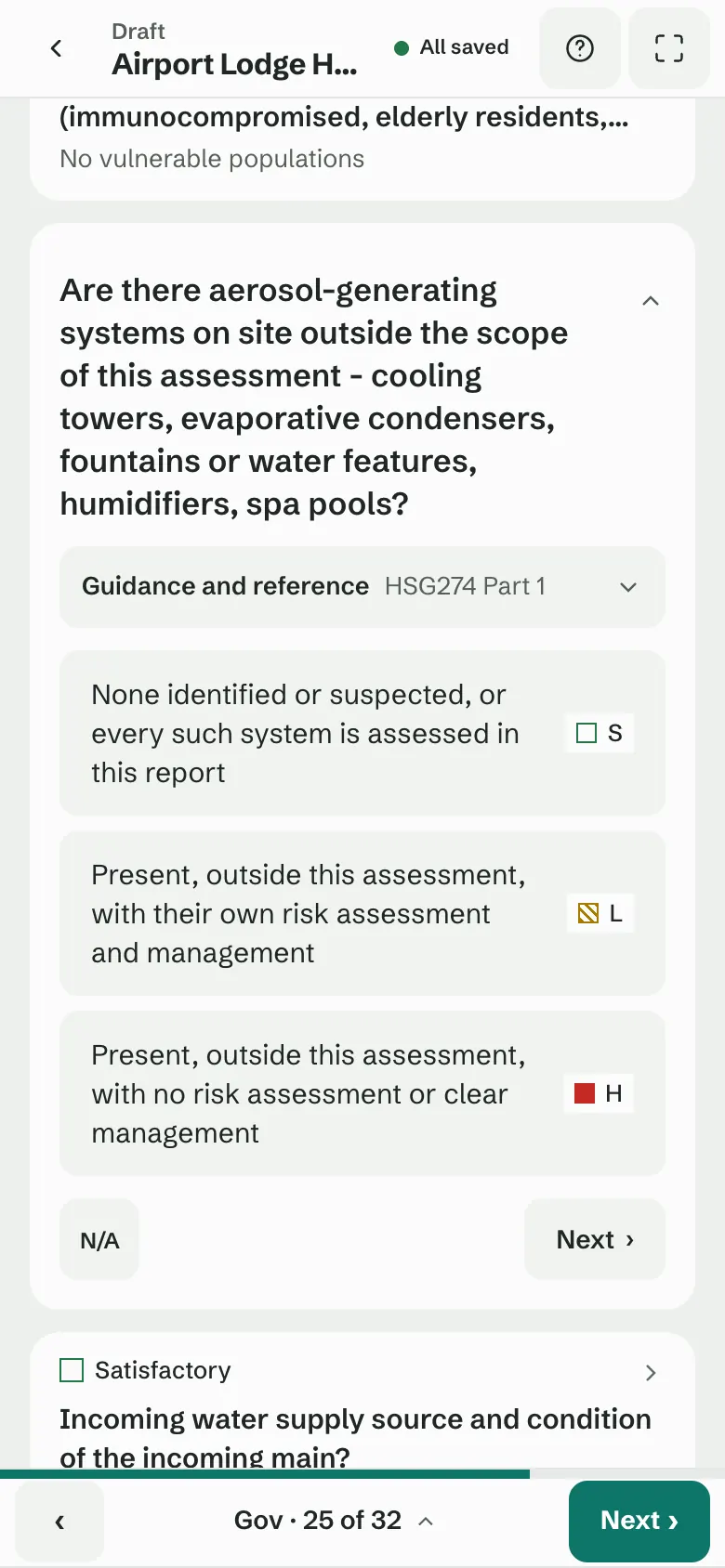
Governance question on a phone: the question with its guidance and reference, three answers each with its grade mark, N/A and Next.
02Asked in interview order
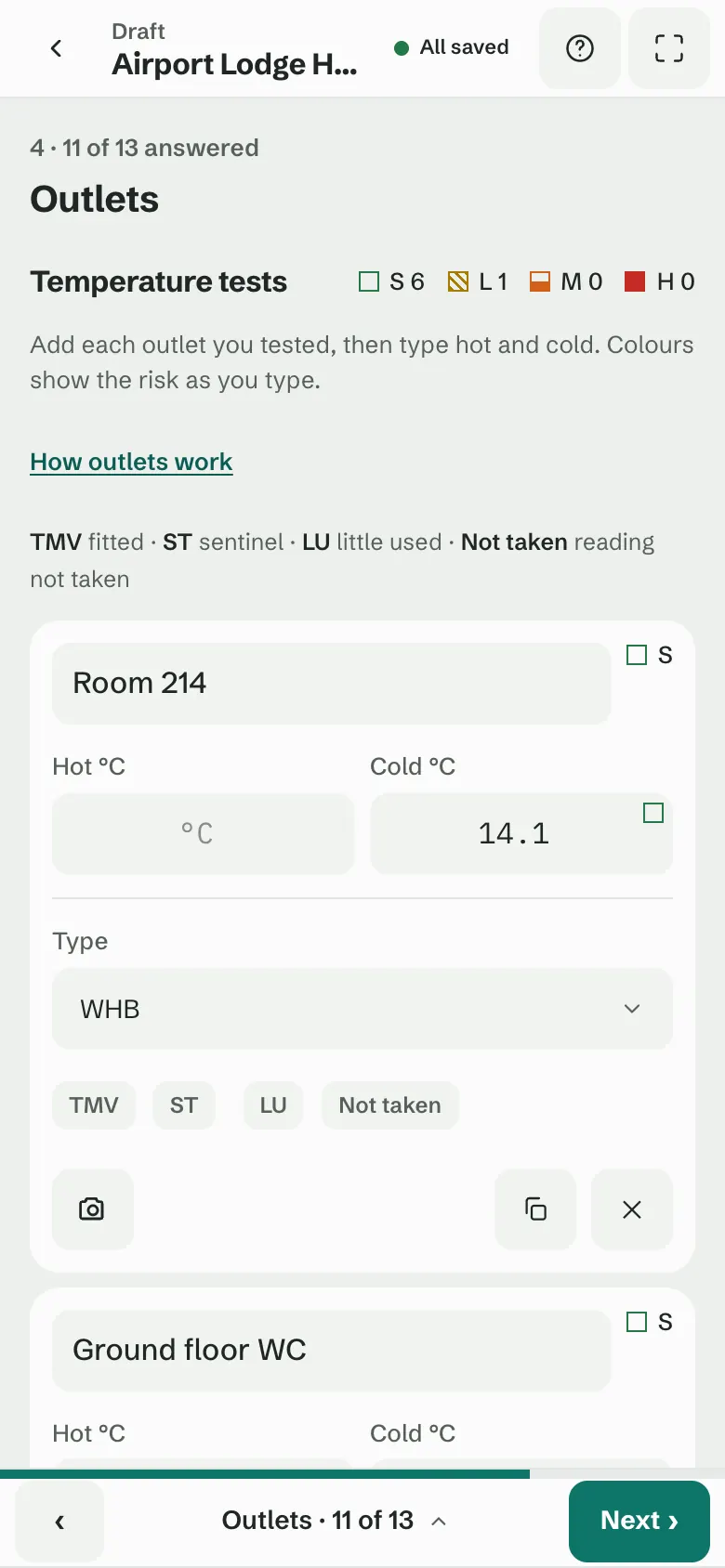
Outlets temperature log on a phone: one card per outlet with hot and cold boxes, the outlet type and its marks.
03Graded as you type
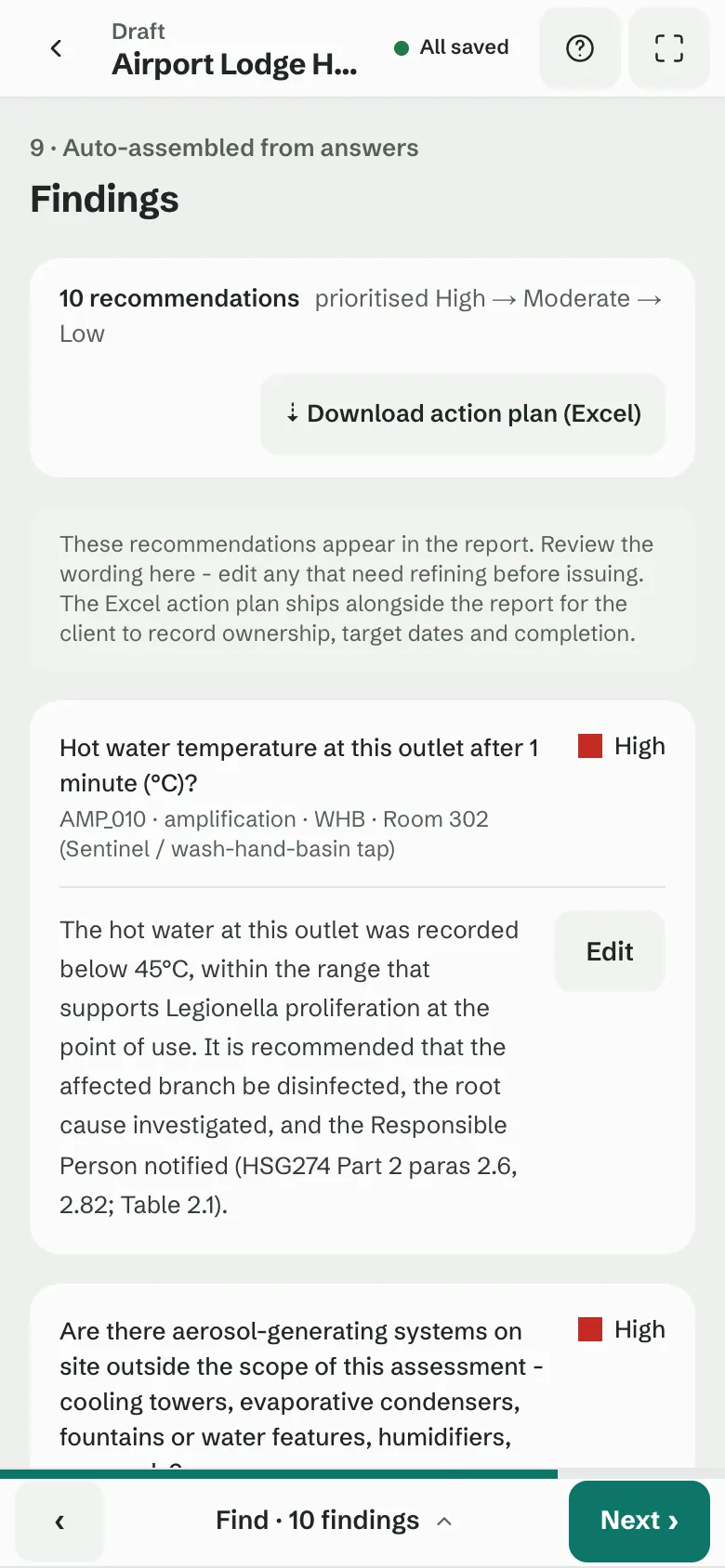
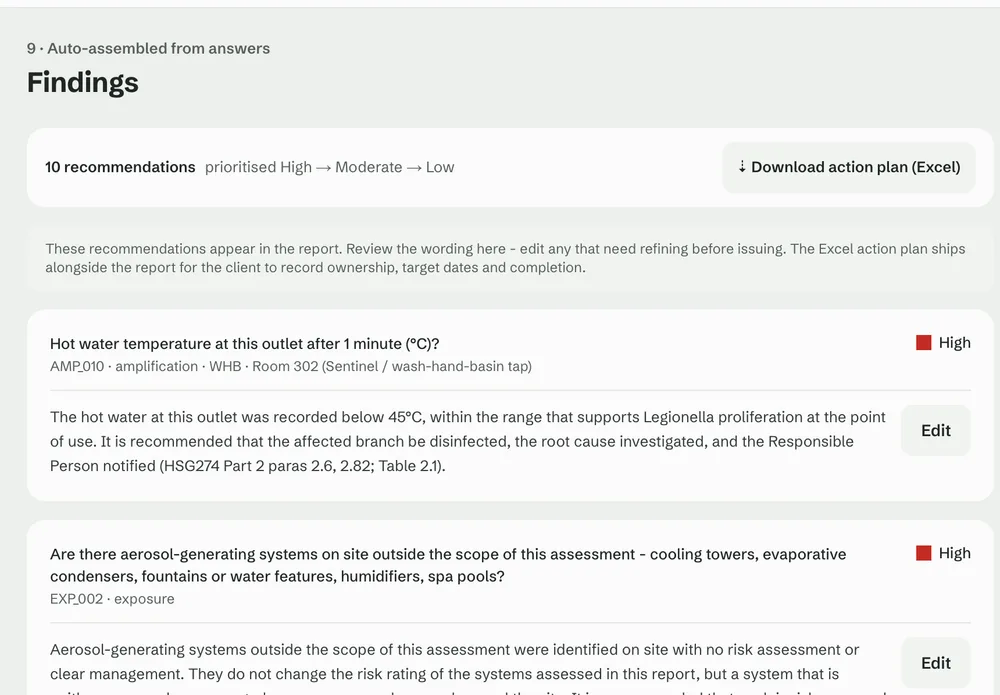
Findings on a phone: ten recommendations prioritised High, Moderate and Low, each with an Edit button, and the action plan download.
04Findings from the answers
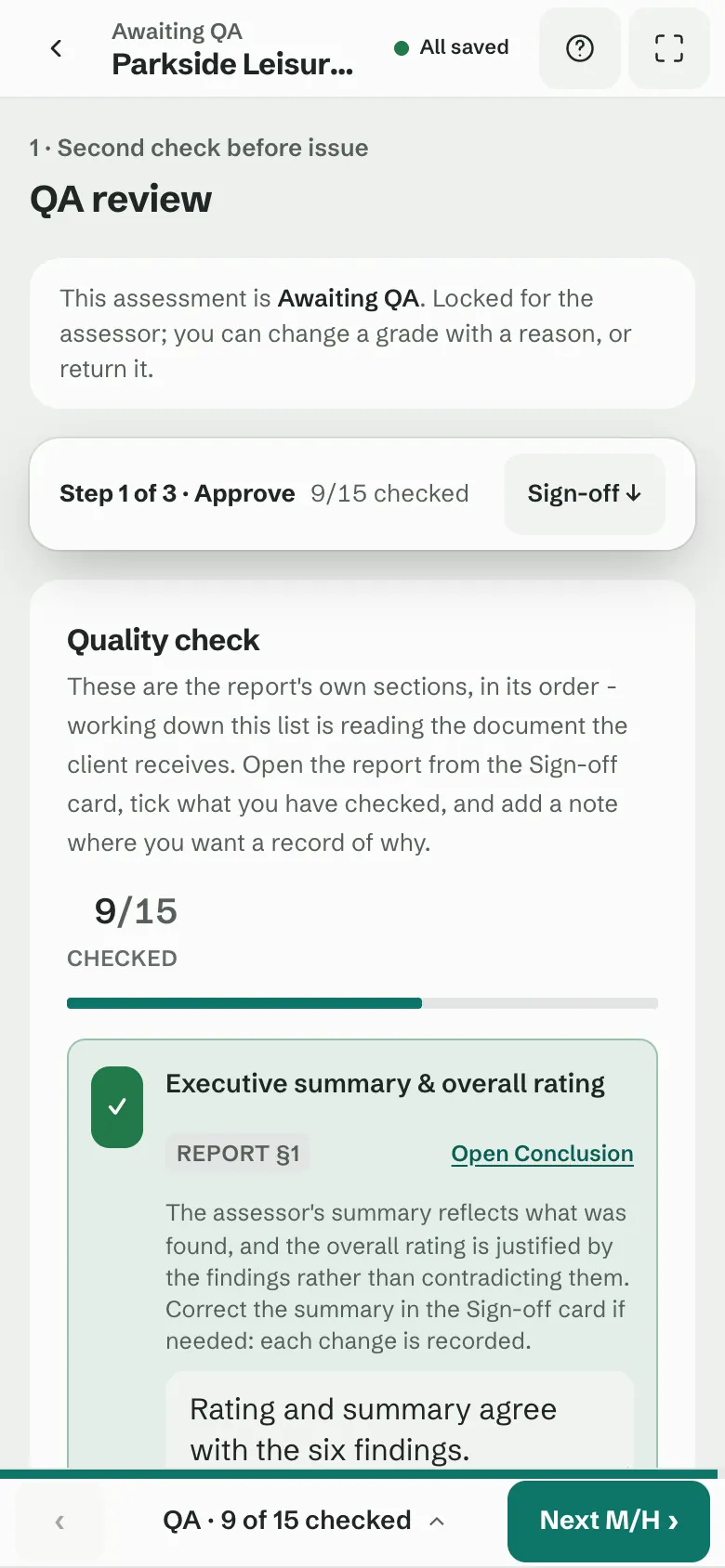
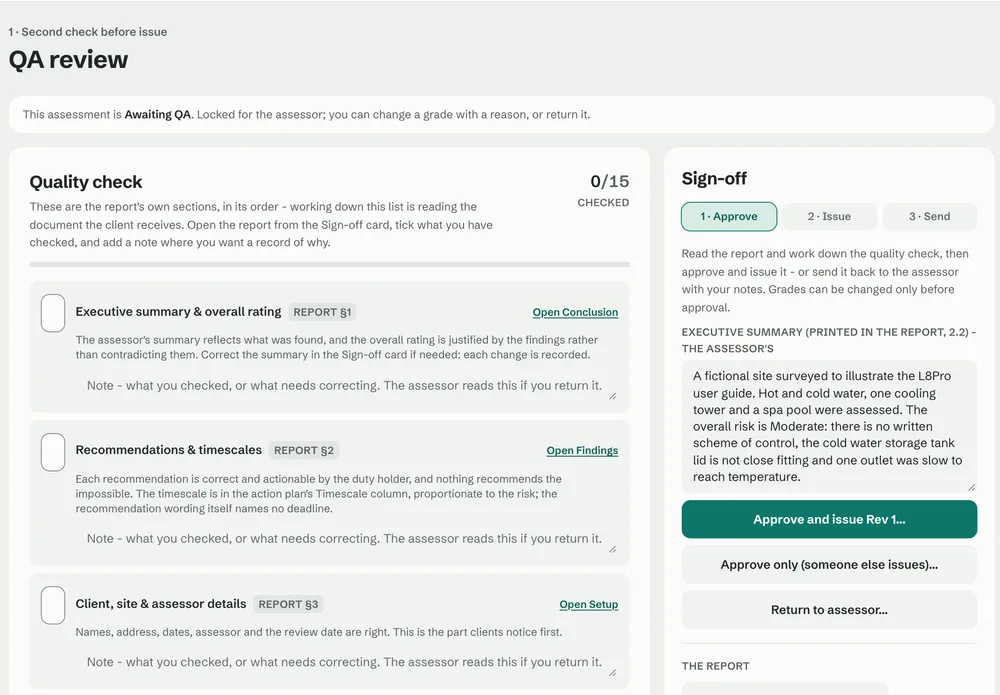
QA review on a phone: the quality checklist, nine of fifteen checked, with the jump to Sign-off.
05A second check before issue
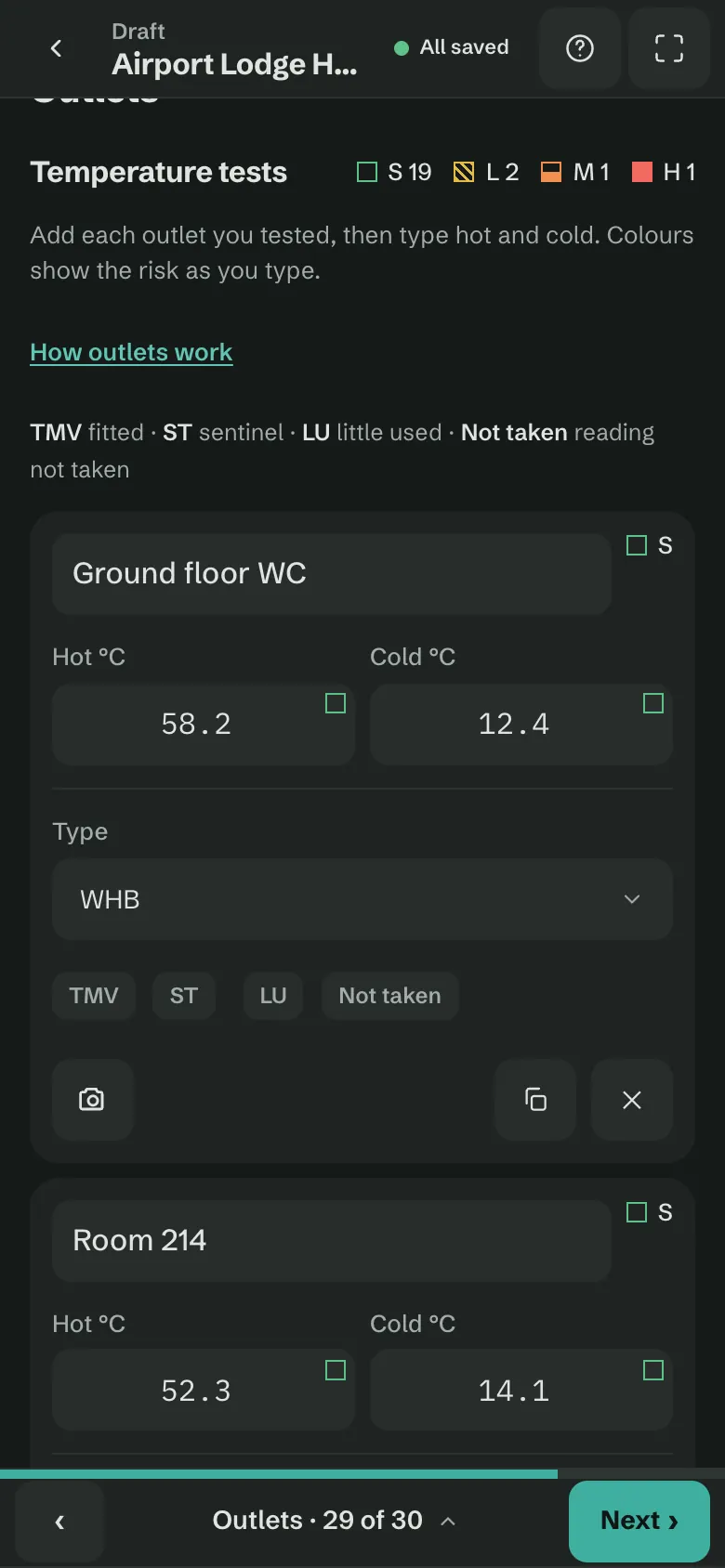
Outlets log on a phone in the dark theme: one card per outlet with hot and cold readings and their grade marks.
06Light or dark
01 / 06
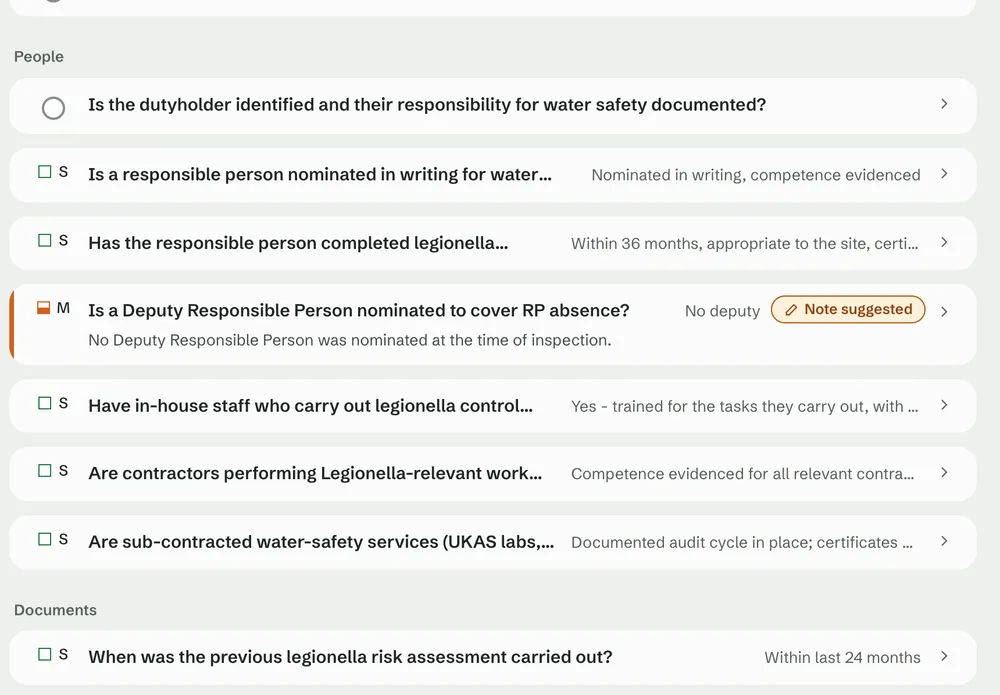
Governance step: questions under the People heading, each with its answer and grade mark, and a suggested note on a Moderate answer.
01Asked in interview order
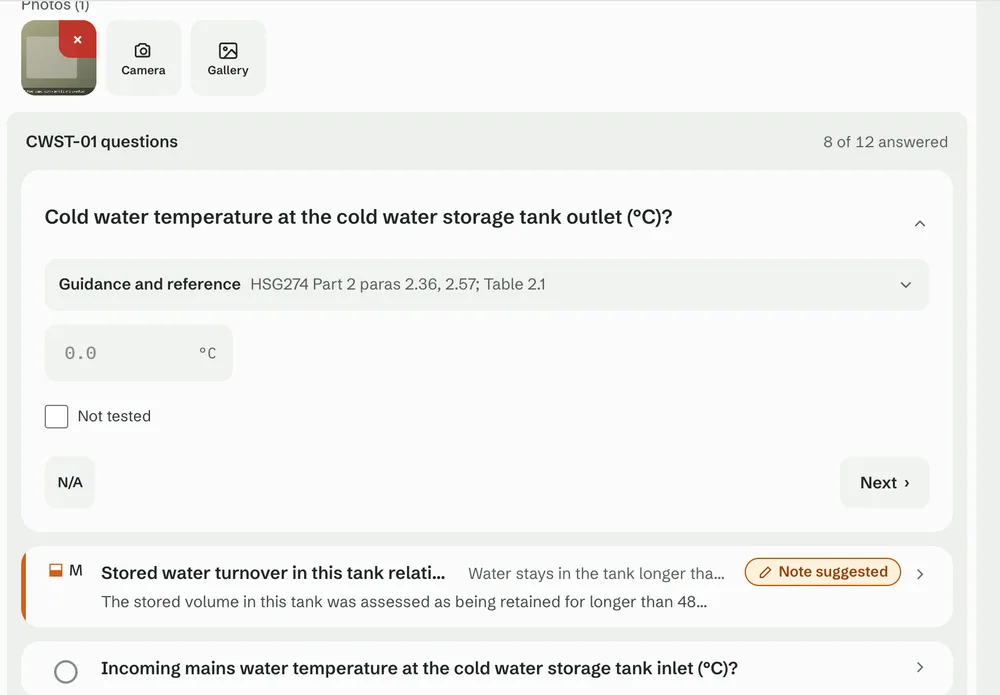
Domestic plant step: the questions for a cold water storage tank, with guidance and reference, a temperature box, N/A and Next.
02Asset by asset
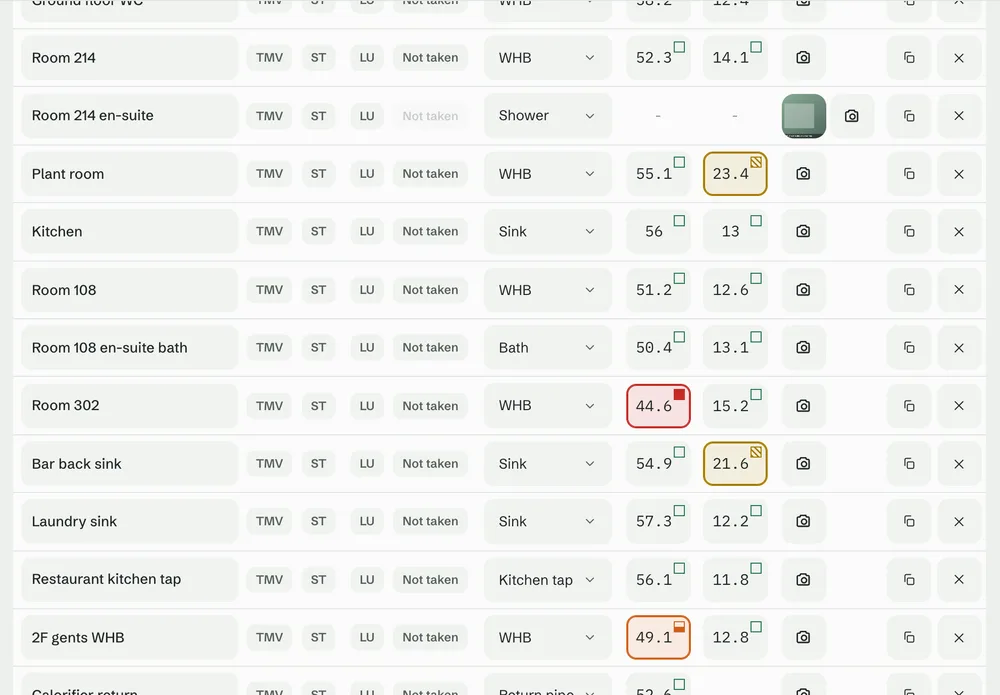
Outlets temperature log: hot and cold readings for each outlet, each marked Satisfactory, Low, Moderate or High as it is typed.
03Graded as you type
Findings step: recommendations assembled from the answers, prioritised High, Moderate and Low, each with an Edit button.
04Findings from the answers
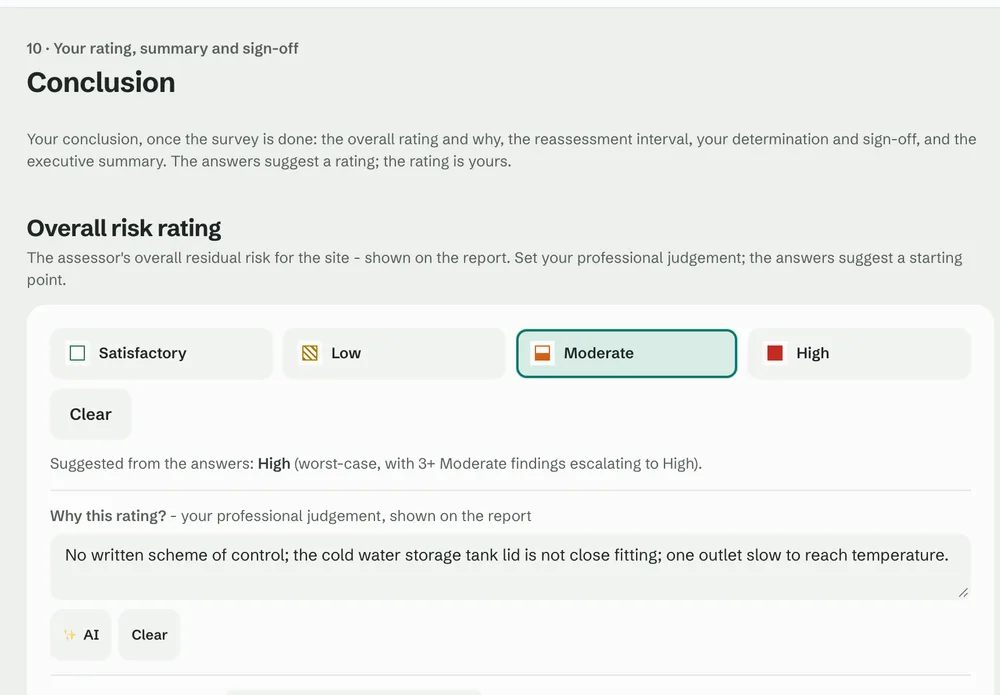
Conclusion step: the overall risk rating chosen from Satisfactory, Low, Moderate and High, the rating the answers suggest, and why.
05Your rating, your judgement
QA review on a larger tablet: the quality checklist with the Sign-off panel beside it to approve, issue or return the report.
06Sign-off beside the checklist

Run a team.Not a spreadsheet.

Every survey from booked to sent in one place. QA is a button, not an email chain with “FINAL_v3” in the subject line.
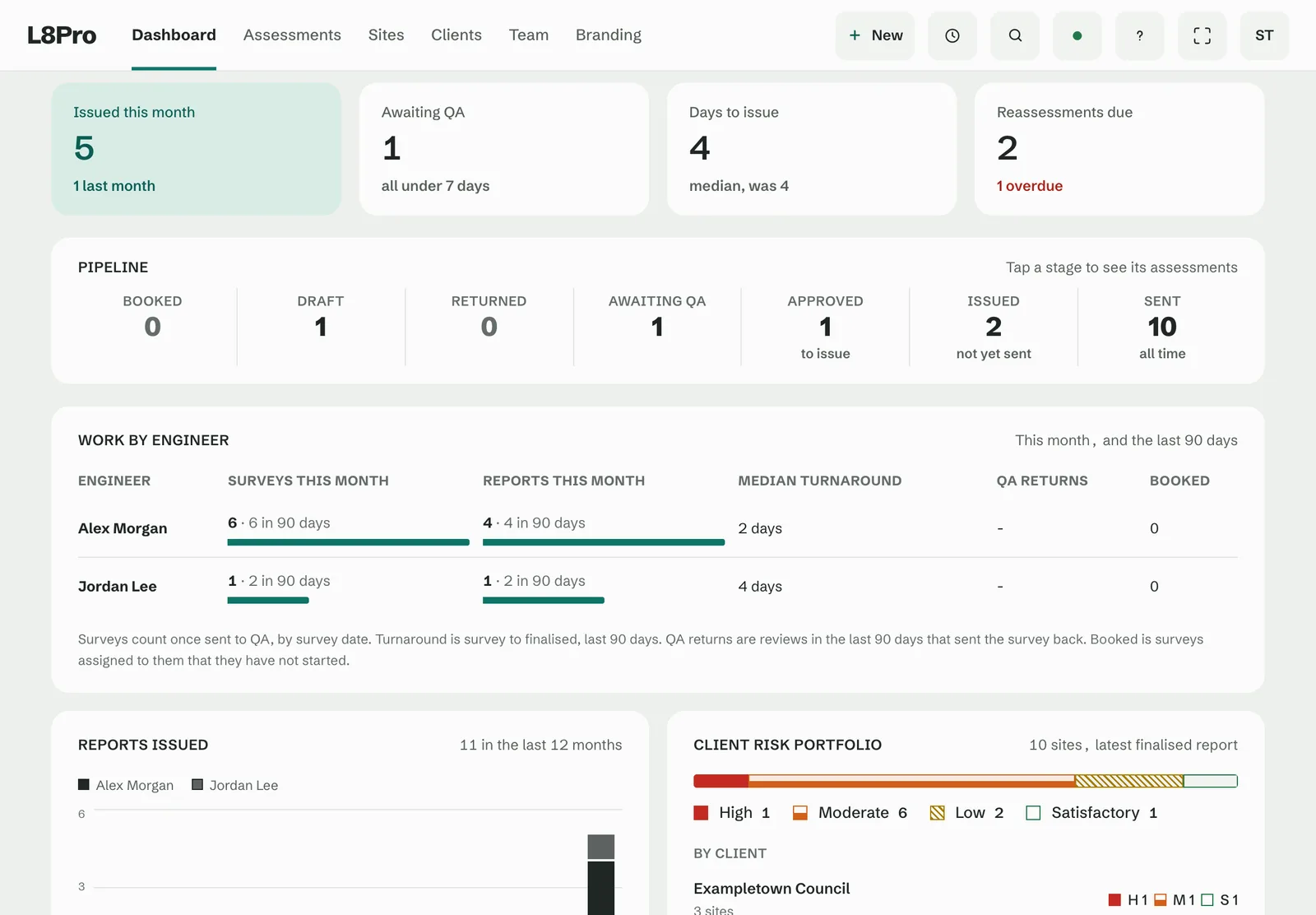
The L8Pro admin dashboard: issued this month, awaiting QA and reassessments due, the pipeline from booked to sent, work by engineer, reports issued and the client risk portfolio.
The L8Pro admin dashboard on a phone: assessments awaiting review, each with its risk rating and an Issue or Review button, and the recent assessments.
QA is a button

Return with a comment, see it fixed, approve. Every return is logged.

See who's stuck

Surveys, reports, turnaround and QA returns for every engineer.

Nothing lapses

Every site's risk rating and next review date in one view.

By an assessor.For assessors.

Who built it

“15 years of reports finished at 10pm. So we fixed it.”

Raf
Founder, L8Pro · 15 years in the water industry

Distilleries, data centres, hospitals, steelworks. L8Pro is the app we wanted on every one of those jobs. It's used on real assessments, and when you ask why a question is there, the answer comes from someone who has stood in the plant room.

City and Guilds (Legionella)AE (Water)MWMSocNEBOSH General

Pay for the team.Not the paperwork.

Domestic
£225 / month
Includes one user. Each extra user £110 / month.
  • Included: Domestic hot and cold waterHSG274 Part 2
  • Not included: Other risk systems, such as spa poolsHSG274 Part 3
  • Not included: Cooling towers and evaporative coolingHSG274 Part 1
Domestic and other risk systems
£295 / month
Includes one user. Each extra user £150 / month.
  • Included: Domestic hot and cold waterHSG274 Part 2
  • Included: Other risk systems, such as spa poolsHSG274 Part 3
  • Not included: Cooling towers and evaporative coolingHSG274 Part 1
All three systems
£375 / month
Includes one user. Each extra user £185 / month.
  • Included: Domestic hot and cold waterHSG274 Part 2
  • Included: Other risk systems, such as spa poolsHSG274 Part 3
  • Included: Cooling towers and evaporative coolingHSG274 Part 1

Need domestic and cooling towers? Cooling towers come with All three systems. All prices are per month. Setup is free on the standard question set, or £2,500 for a custom question set.

Two weeks free.

Use it on your own jobs for two weeks, free. Tell us who you are and we'll set you up on one video call, wherever you are in the UK.

If the trial goes ahead, your invitation goes to this address.

Systems you assess

We use these details to set up your trial. See the privacy policy.

Questions

Does it really work without signal?

Yes. Download the assessment before you go and capture the whole thing offline. It syncs when you're back online.

Tablet, phone or desktop?

Built for a tablet on site. Works on a phone and a desktop too. QA usually happens on the desktop.

Which water systems does it cover?

Domestic hot and cold water (HSG274 Part 2), cooling towers and evaporative cooling (HSG274 Part 1), and spa pools and the other risk systems (HSG274 Part 3). Your plan sets which of them you can assess.

Can the report look like ours?

Your logo, colours and details on every report. The question set can be adapted to how you assess at setup.

How fast can we start?

One video call to set up your account and branding, plus a written guide for your engineers. Then go and do an assessment.

Get yourevenings back.

Start free trialTwo weeks free. We'll set you up on a call.